✦ Studio-Tipp
guide
A cursor clicks a row of ingredients and the cake gains a layer per click, then one last click frosts it and every layer disappears inside. Why the trend works, the shot list, and how to make one.
2. Nov. 2026 · 3 Min. Lesezeit
Diese Anleitung gibt es noch nicht in deiner Sprache, daher wird sie auf Englisch angezeigt.
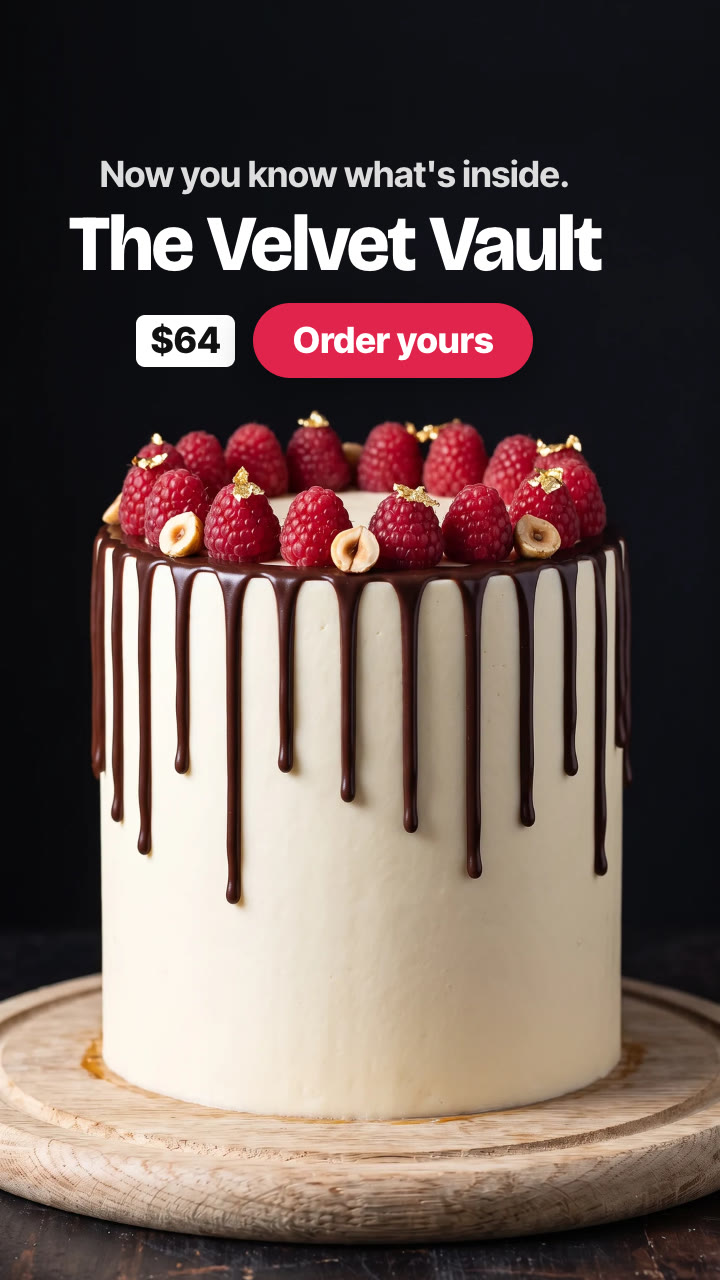
A plain chocolate sponge sits on a board against a black background, with a row of round ingredient buttons above it. A cursor clicks them one by one, and with every click the cake gains a layer in a single frame: salted caramel, hazelnut crunch, fresh raspberries, pistachio cream, more sponge, dark ganache. Then the cursor clicks a palette knife. The cake is suddenly smooth and white, with a chocolate drip and raspberries on top, and every layer is hidden inside. It plays like a little game, and it's one of the best ways to show what goes into a product.
| Time | On screen | Why |
|---|---|---|
| 0–0.9 s | The base on its own, the buttons slide in, the cursor arrives | The setup |
| 0.9–5.7 s | One click every 0.8 s, one layer per click, each with its name | The build |
| About 6.8 s | The finishing click: everything is frosted, every layer hidden | The payoff |
| 7.5–9.5 s | "Now you know what's inside.", the name, price and CTA | The offer and the button |
Keep the camera, the board and the light the same in every stage, so only the top of the product changes. Change each layer in one frame rather than with a fade, and give every layer a colour or texture of its own, so each click is easy to see.
Anything built in layers works: a burger or a stacked sandwich, a trifle or parfait in a glass, a crêpe cake, a bowl built up topping by topping. The finish can be anything that hides the layers: a frosting, a lid, a glaze, the top bun.
The Click to Layer Skill makes the stills with AI, then adds the buttons, the cursor, the clicks, the sound and the text on your machine:
Make a click to layer video for The Velvet Vault cake: chocolate sponge, salted caramel, hazelnut crunch, fresh raspberries, pistachio cream, chocolate sponge, dark ganache, chocolate sponge, then smooth buttercream with a chocolate drip. Line "Now you know what's inside.", price $64, CTA "Order yours".
Your agent first makes the full build with every layer showing and shows it to you. Every stage is then cut from that one photo, so nothing jumps between clicks. See the cake sample.
Do I need a photo? No. A list of the layers is enough, and a photo of the finished product helps it look like yours.
Is the sound included? Yes. Clicks, plops, a swipe and a chime on the finish, all made for your timing, so there's nothing to license.
How long is it? About 9 to 10 seconds.