Kostenlos
guide
The stretch-art poster pulls one row of a photo's pixels into streaks and silk-like ribbons around the subject. How the Photoshop technique works, layout tips, and how to render an animated version from your own photos.
27. Okt. 2026 · 3 Min. Lesezeit
Diese Anleitung gibt es noch nicht in deiner Sprache, daher wird sie auf Englisch angezeigt.
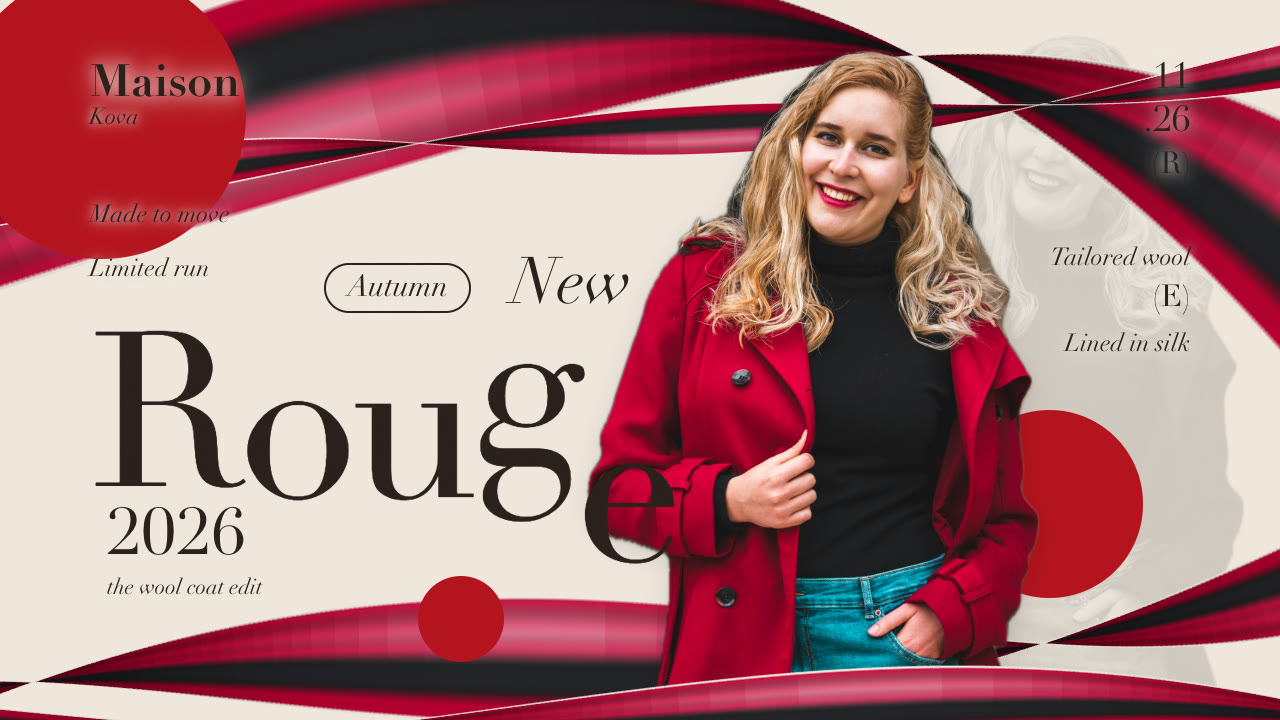
The stretch-art poster is a fashion and portrait style built on a simple trick: take a single row of pixels from the photo and stretch it until it becomes streaks. Those streaks, bent into curves, turn into silk-like ribbons that carry the exact colours of the subject's hair and clothes. Put a large serif title in front, a few small editorial notes around the head and some solid discs, and you get a poster that looks art-directed even from one ordinary photo.
In Photoshop the classic method takes a minute:
The ribbon always matches the photo because it is the photo: a red coat gives red silk, blonde hair gives cream highlights.
The popular video version of this poster shows it being made: the finished poster for a split second, then the raw photo, the row of pixels stretching down, the ribbons sweeping in, the type stacking up, quick cuts between poses from the same shoot, and a wipe from the original photo to the finished design.
The free Stretch Art Poster Skill renders exactly that from your photos, on your machine, with no Photoshop:
Make a stretch-art poster for our autumn coat drop with these four photos of our model: title "Rouge", kicker "New", badge "Autumn", year "2026", heading "Maison Kova". 9:16 and 4:5.
Your agent cuts the photos out (on a Mac it uses the built-in Vision framework), samples the row you choose with stretchAt, draws the ribbons from it and renders MP4s in 16:9, 9:16, 4:5 and 1:1, plus a still poster frame you can post on its own. More on rendering video with an agent: Claude Opus 5.5 video generation.
Use photos from one shoot (same person, light and outfit) so the pose swaps read as one poster. And only use photos of someone who agreed to appear in your marketing, or stock photos whose licence covers advertising. A person's likeness isn't free to use just because the photo is online.
Which row should I stretch? One that crosses both hair and clothing gives the most colour variation. Rows through plain fabric give calmer, single-colour ribbons.
Does it work without a person? The style is built around a portrait. For products, try a product reveal instead.
Can I use my brand colours? Yes: the background, the ink colour and the disc colour are all settable. The ribbons always take their colours from the photo.