✦ スタジオのおすすめ
guide
The price-tag rip is the simplest Black Friday opener there is. A hand tears the regular-price sticker off your product and the sale price is underneath. Why price-first openers work, what to put on screen, and how to make one from a product photo.
2026年10月29日 · 約3分で読めます
このガイドはまだお使いの言語に対応していないため、英語で表示しています。
On Black Friday, everyone in the feed is selling at once. The ads that get watched say the price before anything else. Marketers' analyses of past seasons point the same way: videos that show a price or discount first tend to convert better than ones that open on a gift idea or a mood. Treat that as a direction, not a promise. Leading with the price is what matters.
The price-tag rip is the most physical way to do it. You don't read "was $48, now $29". You watch a hand tear the $48 off and see $29 underneath.
| Time | On screen |
|---|---|
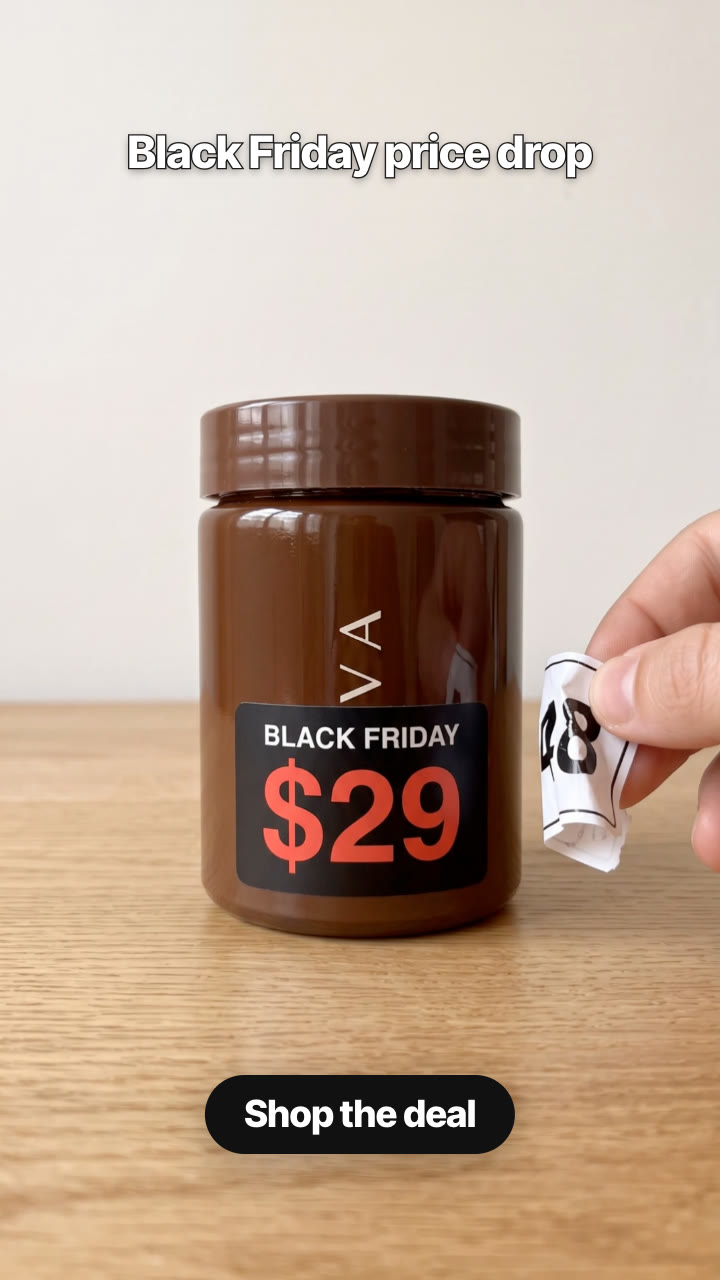
| 0–1.5 s | Your product on a table with a white price sticker: the regular price. A hand pinches the corner. The caption reads "Black Friday price drop". |
| 1.5–3.5 s | One tug: the sticker rips off and curls away. Underneath is a black sticker that says BLACK FRIDAY over the sale price in big red numbers. |
| 3.5–6 s | The new price stays on screen, the hand holds the torn sticker to the side, and the CTA lands: "Shop the deal". |
The Price Tag Rip Skill makes the whole ad from one product photo and your two prices:
Make a Black Friday price tag rip for our Kova jar: the $48 sticker gets ripped off and $29 is underneath. Caption "Black Friday price drop", button "Shop the deal". Vertical and 4:5.
Your agent makes two keyframes with Nano Banana 2 (the white sticker with your regular price, then the sticker ripped off and your sale price revealed) and shows them to you, so you can check that both prices are exactly right. Then Kling 2.5 Turbo animates the rip. It costs about $0.51 in model usage on your own API key. See the sample ad.
Change the label for other sales: CYBER MONDAY, HOLIDAY SALE, or the same words in your own language.
The regular price has to be what the product really sold for, and the sale price has to be what people pay. Inflating the "was" price to make the drop look bigger misleads buyers, and in many countries it breaks price-advertising rules. The Skill asks your agent to confirm both prices with you before anything is generated.
Does it work for any product? It works best for products that stand on a table: beauty, skincare, candles, bottles, gadgets, boxed goods. For clothing on a person, a try-on format works better.
Will the prices be spelled right? Your prices are written into both keyframes, and you check them before the video step. If a number comes out wrong, that step runs again; the video is only made once both are right.
How long is it? Six seconds: the rip takes about two, and the reveal holds for the CTA.