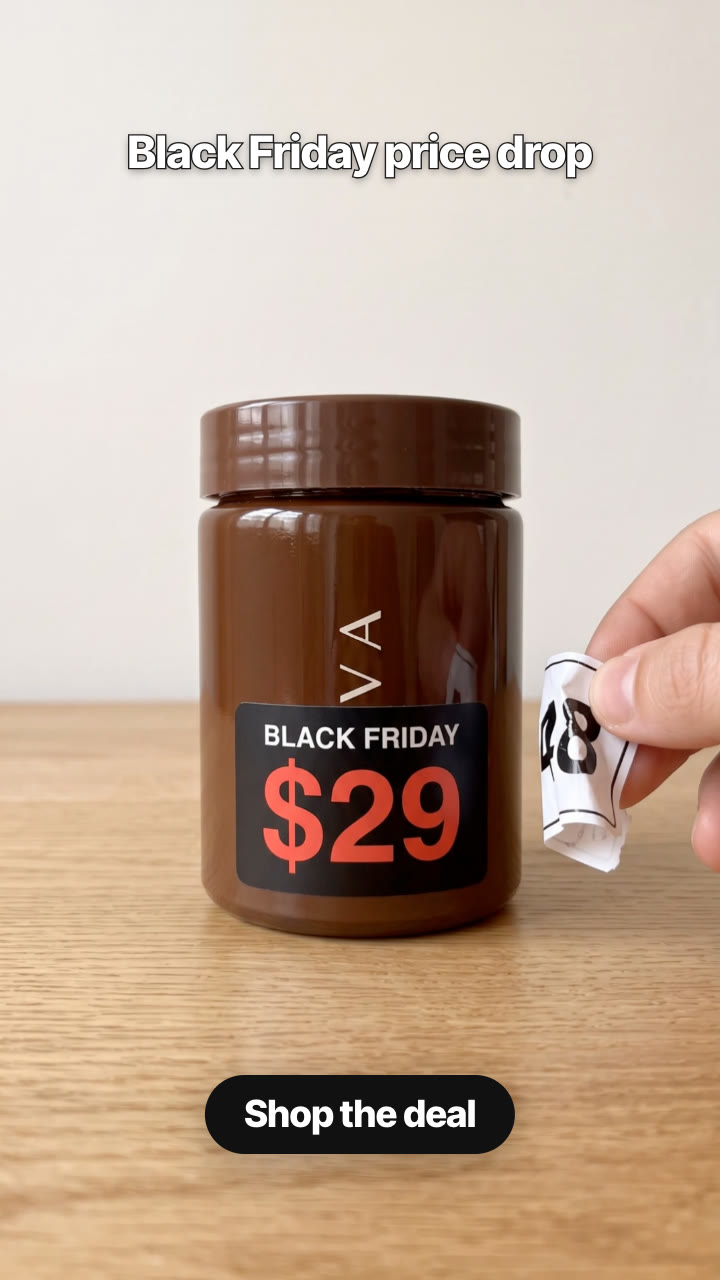
Give it one product photo, the regular price and the sale price. It makes a 6-second Black Friday ad that puts the price in the first frame: your product on a table with a white price sticker, a hand rips it off in one tug, and a black sticker with the Black Friday price is revealed underneath. Then your caption and CTA, in 9:16 or 4:5.
/price-tag-rip Make a Black Friday price tag rip for our Kova jar: the $48 sticker gets ripped off and $29 is underneath. Caption "Black Friday price drop", button "Shop the deal". Vertical and 4:5.
A close-up of your product on a table, with a white paper price sticker showing the regular price. A hand comes in from the side, pinches the corner and rips the sticker off in one tug; the paper curls away, and underneath is a matte-black sticker that says BLACK FRIDAY over the new price in big red numbers. The hand holds the torn sticker to the side while the new price stays on screen, your caption runs at the top, and the CTA lands at the bottom.
How it works
Brief: your agent asks only for what's missing: one clear photo of the product, its real regular price and the sale price, and optionally a different label than BLACK FRIDAY (for example CYBER MONDAY), the surface it stands on, a caption and a CTA. You also need an API key for the two models it calls, Nano Banana 2 and Kling 2.5 Turbo; each film costs about $0.51 in model usage.
Keyframes: it turns your product photo into two stills (the white sticker with your regular price, then the sticker ripped off and your sale price revealed) and shows them to you before spending more.
Motion: Kling 2.5 Turbo animates the rip between them in 5 seconds; the reveal then holds for the CTA.
Caption and CTA: optional, rendered over the film on your machine in any language, for 9:16, 4:5 or 1:1.
Tips
Use a sharp photo of the product on its own, front-facing, with the label visible; the product is kept as it is in the photo.
Use real prices: the regular price must be what the product actually sold for, and the revealed price what people pay in the sale.
Check both keyframes before the video step: the prices must be spelled exactly. Keyframes cost about $0.16, the video about $0.35.
Keep the caption short and leave the price to the sticker; the film is silent, so add the trending sound in the app.
What you need before you start
You bring
One clear photo of the product, its real regular price and the sale price, and optionally a different label than BLACK FRIDAY (for example CYBER MONDAY), the surface it stands on, a caption and a CTA. You also need an API key for the two models it calls, Nano Banana 2 and Kling 2.5 Turbo; each film costs about $0.51 in model usage.
Dependencies
Node.js 20 or newer — required · Google Chrome (or CHROME_PATH) — required · An API key for Nano Banana 2 and Kling 2.5 Turbo — required · FFmpeg — bundled via ffmpeg-static after npm install
Outside costs
Model usage, billed to your own API key: about $0.16 for the two Nano Banana 2 keyframes and $0.35 for the 5-second Kling 2.5 Turbo clip, so about $0.51 per film (October 2026 prices). Captions, CTAs and the final MP4 render free on your machine.
Last tested
v1.0.0 —
User reviews
No reviews yet. Install the Skill and be the first to rate it.
FAQ
What do I need besides the product photo?
An API key for the two models the Skill calls: Nano Banana 2 for the two keyframes and Kling 2.5 Turbo for the rip. You set it in your own terminal, and the Skill's setup step shows where to get it. Model usage is billed to your key: about $0.51 per film at October 2026 prices.
Are the prices on the stickers exact?
Your prices are written into both keyframes, and your agent shows them to you before the video step. If a number comes out wrong, run that step again; the video is only made once both are right.
Can I change BLACK FRIDAY to something else?
Yes. Set the label to CYBER MONDAY, HOLIDAY SALE or any short text in any language.
Does it keep my product as it is?
The keyframes are made from your photo and keep its shape, colours and label; the sticker may cover part of the label, as a real price sticker would. Check the keyframes before the video step.