✦ スタジオのおすすめ
guide
A cook rests a gloved hand on a burger, and on that exact frame the black-and-white scene snaps into colour. Why the trend works, the shot list, and how to make one from a product photo.
2026年11月1日 · 約3分で読めます
このガイドはまだお使いの言語に対応していないため、英語で表示しています。
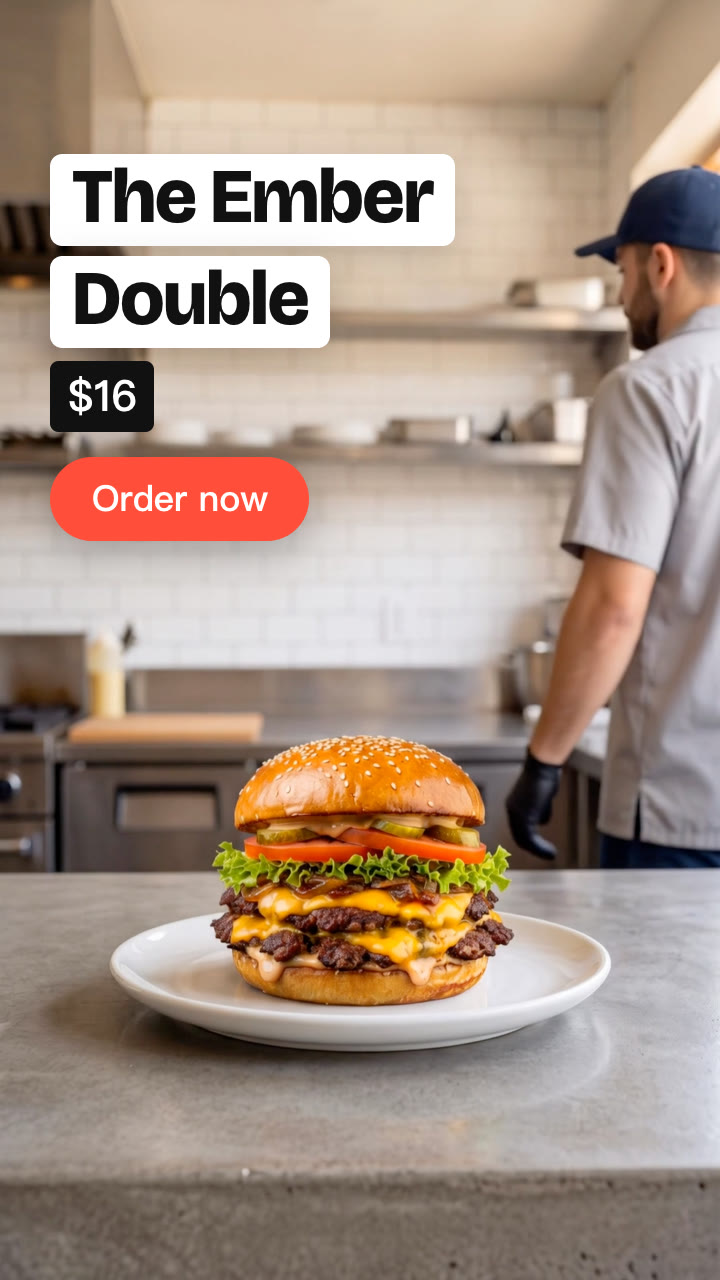
A cook stands behind the counter with a burger on a plate in front of him, and the whole picture is black and white. He reaches out and rests a gloved hand on the bun. On that exact frame, everything snaps into colour: the kitchen, the cook and the burger. He lifts his hand and walks off, and the name and the button come in. It takes about four seconds, and it's one of the simplest hooks in food video right now.
| Time | On screen | Why |
|---|---|---|
| 0–1.7 s | Black and white; the caption; the person reaches out | The setup |
| About 1.7 s | The hand lands on the product and the whole picture switches to colour, with a small jolt and a ding | The payoff |
| 1.7–6.5 s | The person walks off; the name, price and CTA come in over the product in colour | The offer and the button |
The trend is one take: a person, a counter, one product. Switch the whole picture, not just the product, and switch it in one frame, not with a fade. Let the hand rest for a moment rather than tapping, so the switch has something to land on.
Anything whose colour sells it works the same way: a lipstick on a vanity, a sneaker on a shop counter, a bouquet on a florist's bench, a cocktail on a bar. Pick a product that's rich in colour and set it against a plain, light background.
The Touch to Colour Skill makes the footage with AI from one product photo, finds the frame the hand lands, and adds the black-and-white, the switch, the sound and the text on your machine:
Make a touch to colour video for The Ember Double burger: a cook in a burger joint kitchen touches it and the black-and-white scene turns to colour. Caption "Too good for black & white", price $16, CTA "Order now".
Your agent shows you the two keyframes (the person behind your product, then walking off) before it makes the video, so the product looks right before you spend more. See the burger sample.
Do I need to film anything? No. One clear photo of the product is enough.
Is the sound included? Yes. A whoosh as the hand comes in, a ding on the switch and ticks for the text, all made for your timing, so there's nothing to license.
How long is it? About 6 to 7 seconds.