✦ Studio-Tipp
guide
The 10-second Halloween transformation everyone is posting: a black clawed hand takes yours, the screen goes black, and you're back as a moon witch with a finger to your lips. What happens second by second, and how to make it with AI from one photo.
29. Okt. 2026 · 3 Min. Lesezeit
Diese Anleitung gibt es noch nicht in deiner Sprache, daher wird sie auf Englisch angezeigt.
The Halloween format filling TikTok and Reels feeds this October takes ten seconds. It started as an AI template on CapCut and spread fast, because it turns one ordinary selfie into a short horror film with a reveal.
| Time | On screen |
|---|---|
| 0–1 s | You face the camera, eyes closed, one hand held out flat. Black claw tips appear at the bottom of the frame. |
| 1–2.5 s | A slender jet-black hand with long pointed nails rises toward yours. |
| 2.5–4.2 s | Its fingers slide between yours and grip. |
| ~4.4 s | Both hands sweep into the lens and the screen goes black. |
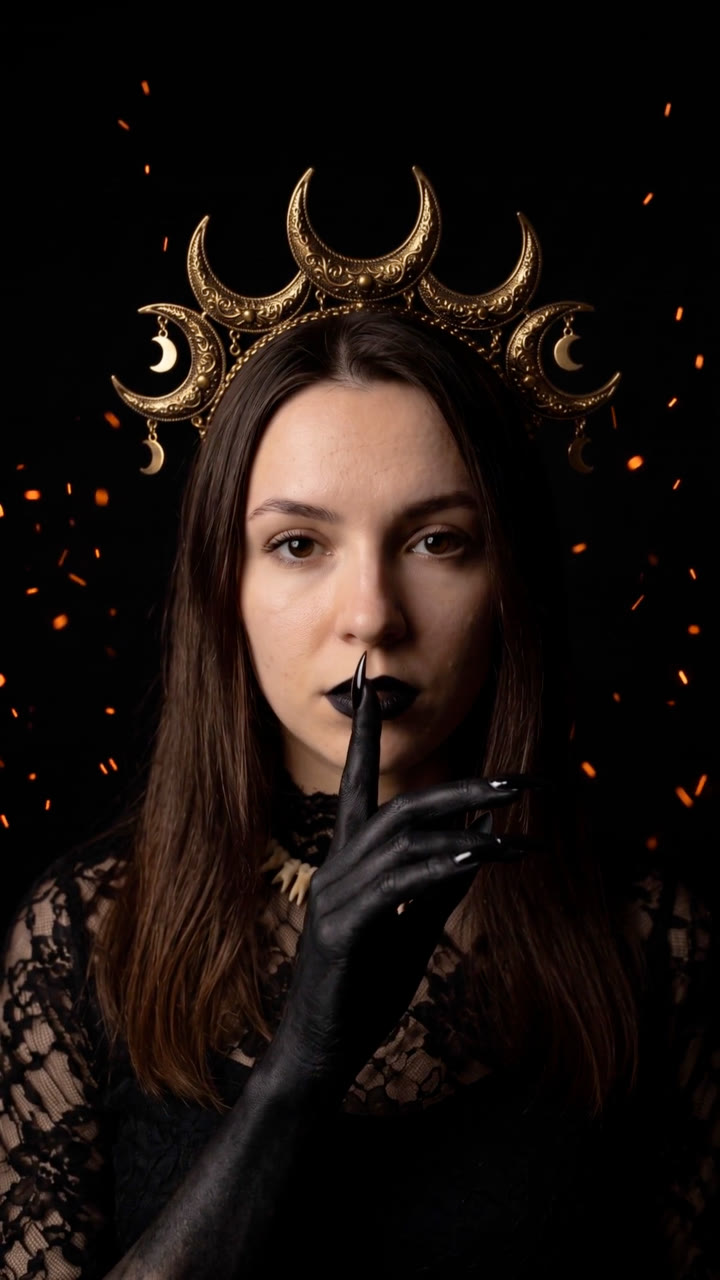
| 4.5–7.5 s | You're back as a moon witch: a gold crescent crown hung with small moons, black lips with a line down the chin, a bone-tooth collar, a high-necked black lace gown, black clawed hands, embers drifting behind. |
| 7.5 s–end | You raise one black finger to your lips, "shh", and hold. |
You don't need the template or a costume. The Halloween AI Transformation Skill makes the whole film from one front-facing selfie:
Make the Halloween transformation from this selfie: the black hand takes mine, then I'm back as the moon witch with a finger to my lips. Vertical for TikTok and a 4:5 for Instagram.
Your agent turns the photo into four keyframes with Nano Banana 2 (eyes closed with the hand out, the hands at the lens, the costume, the "shh") and shows them to you. Then Kling 2.5 Turbo animates both halves, and they are joined around the cut to black at 4.4 seconds. It costs about $1 in model usage on your own API key. See the sample film.
Want a different costume? Describe it: "a vampire queen in a high-collared crimson velvet cape, pale skin, dark red lips". The hand and the cut stay the same, and only the reveal changes.
Add the trending sound inside TikTok or Instagram (the film is silent, so you can use the platform's licensed audio), and line the drop up with the cut at 4.4 seconds. Put your brand, costume or promo in the caption, or add a short CTA at the end.
Use your own photo, a photo of someone who agreed to appear, or stock whose licence allows it: front-facing, chest up, evenly lit. The person in our sample is AI-generated, not a real person.
Does it keep my face? Yes. Every keyframe is made from your photo, and the video follows the keyframes. Check them before the video step.
Is it only for creators? No. Beauty, costume and fashion brands use it to show a look, and shops open Halloween promos with it.
How long is it? About ten seconds, in 9:16, 4:5 or 1:1.