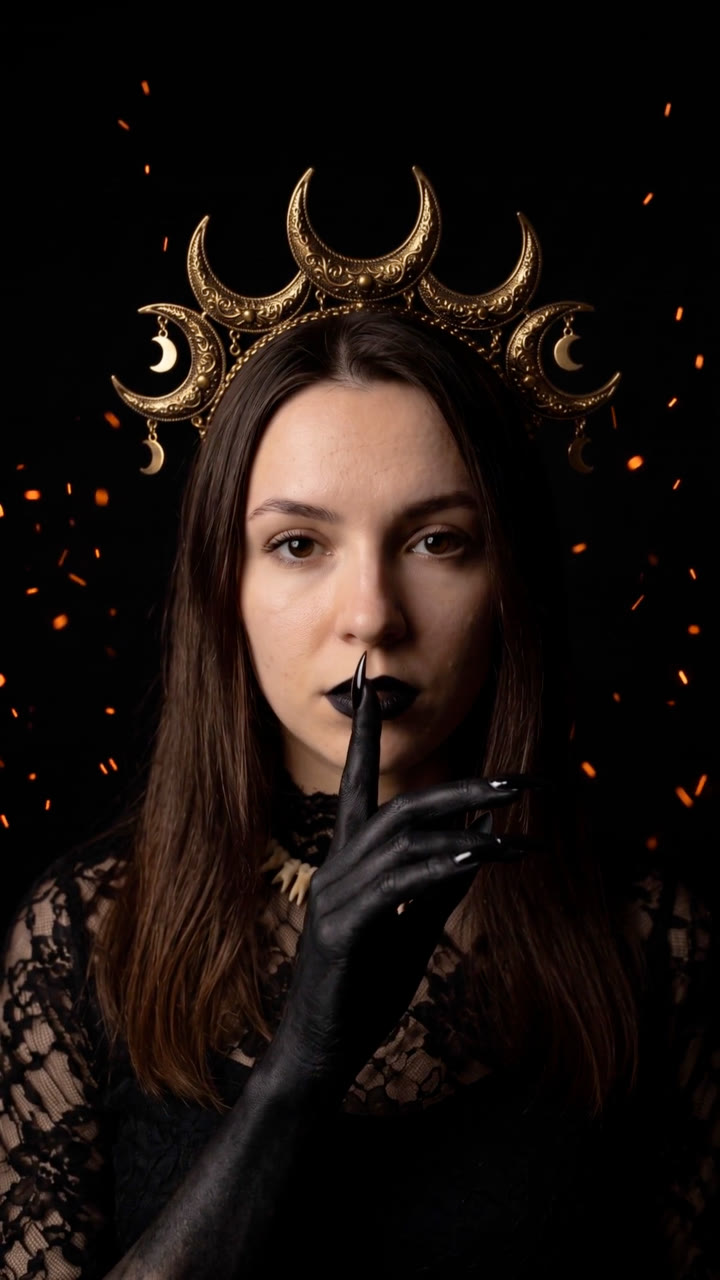
One selfie in, the viral Halloween transformation out: a black clawed hand takes yours, the screen goes black, and you're back as a moon witch with a finger to your lips.
Give it one front-facing photo. It makes the 10-second Halloween transformation everyone is posting: eyes closed, a jet-black clawed hand rises and laces through your fingers, both hands sweep into the lens, and you reappear in full costume on pitch black with drifting embers, raising a finger to your lips. Moon witch by default, or any costume you describe.
/halloween-ai-transformation Make the Halloween transformation from this selfie: the black hand takes mine, then I'm back as the moon witch with a finger to my lips. Vertical for TikTok and a 4:5 for Instagram.
The film runs in two halves around a cut to black. First, the person faces the camera with their eyes closed and one hand held out; a slender jet-black hand with long pointed claws rises from the bottom of the frame, slides its fingers between theirs, and both hands sweep into the lens. Then the same person is back in costume: by default a moon witch with an antique gold crescent crown hung with small moons, black lips with a line down the chin, a bone-tooth collar, a high-necked black lace gown and black clawed hands, on pitch black with orange embers drifting behind. They raise one black finger to their lips, "shh", and hold.
How it works
Brief: your agent asks only for what's missing: one front-facing photo of one person from the chest up, clearly lit, and optionally the costume to turn into (the default is the moon witch), a caption and a CTA. You also need an API key for the two models it calls, Nano Banana 2 and Kling 2.5 Turbo; each film costs about $1 in model usage.
Keyframes: it turns your photo into four stills (eyes closed with the hand out, the hands at the lens, the costume, the "shh") and shows them to you before spending more.
Motion: Kling 2.5 Turbo animates both halves, and they are joined around a cut to black at 4.4 seconds, the same timing as the trend.
Captions and CTA: optional, rendered over the film on your machine in any language, for 9:16, 4:5 or 1:1.
Tips
Use a sharp, front-facing photo from the chest up with even light; the person's face, eyes and hair carry over into the costume.
Describe a different costume concretely if you want one: "a vampire queen in a high-collared crimson velvet cape, pale skin, dark red lips" works better than "a vampire".
Check the four keyframes before the video step: they cost about $0.32, the video about $0.70.
Post it with the trending sound in the app; the film is silent, and the cut to black lands at 4.4 seconds.
What you need before you start
You bring
One front-facing photo of one person from the chest up, clearly lit, and optionally the costume to turn into (the default is the moon witch), a caption and a CTA. You also need an API key for the two models it calls, Nano Banana 2 and Kling 2.5 Turbo; each film costs about $1 in model usage.
Dependencies
Node.js 20 or newer — required · Google Chrome (or CHROME_PATH) — required · An API key for Nano Banana 2 and Kling 2.5 Turbo — required · FFmpeg — bundled via ffmpeg-static after npm install
Outside costs
Model usage, billed to your own API key: about $0.32 for the four Nano Banana 2 keyframes and $0.70 for the two 5-second Kling 2.5 Turbo clips, so about $1 per film (October 2026 prices). Captions, CTAs and the final MP4 render free on your machine.
Last tested
v1.0.0 —
User reviews
No reviews yet. Install the Skill and be the first to rate it.
FAQ
What do I need besides the photo?
An API key for the two models the Skill calls: Nano Banana 2 for the four keyframes and Kling 2.5 Turbo for the motion. You set it in your own terminal, and the Skill's setup step shows where to get it. Model usage is billed to your key: about $1 per film at October 2026 prices.
Can I choose a different costume?
Yes. The moon witch is the default; describe any costume (vampire, skeleton queen, fallen angel) and the reveal half uses it. The hand and the cut stay the same.
Does it keep my face?
Every keyframe is made from your photo with the same face, eyes and hair, and the video is anchored to those keyframes. Check them before the video step and regenerate any that drift.
Can I use any photo of a person?
Only your own, a photo of someone who agreed to appear in your post or ad, or stock whose licence allows it.