✦ Escolha do estúdio
guide
How to turn one front-facing photo into a fashion film where silk ribbons swirl, the model turns with them and the outfit flows into a new colourway. The keyframe method, the prompts, the cost and what to check.
27 de out. de 2026 · 4 min de leitura
Este guia ainda não está disponível no seu idioma, por isso aparece em inglês.
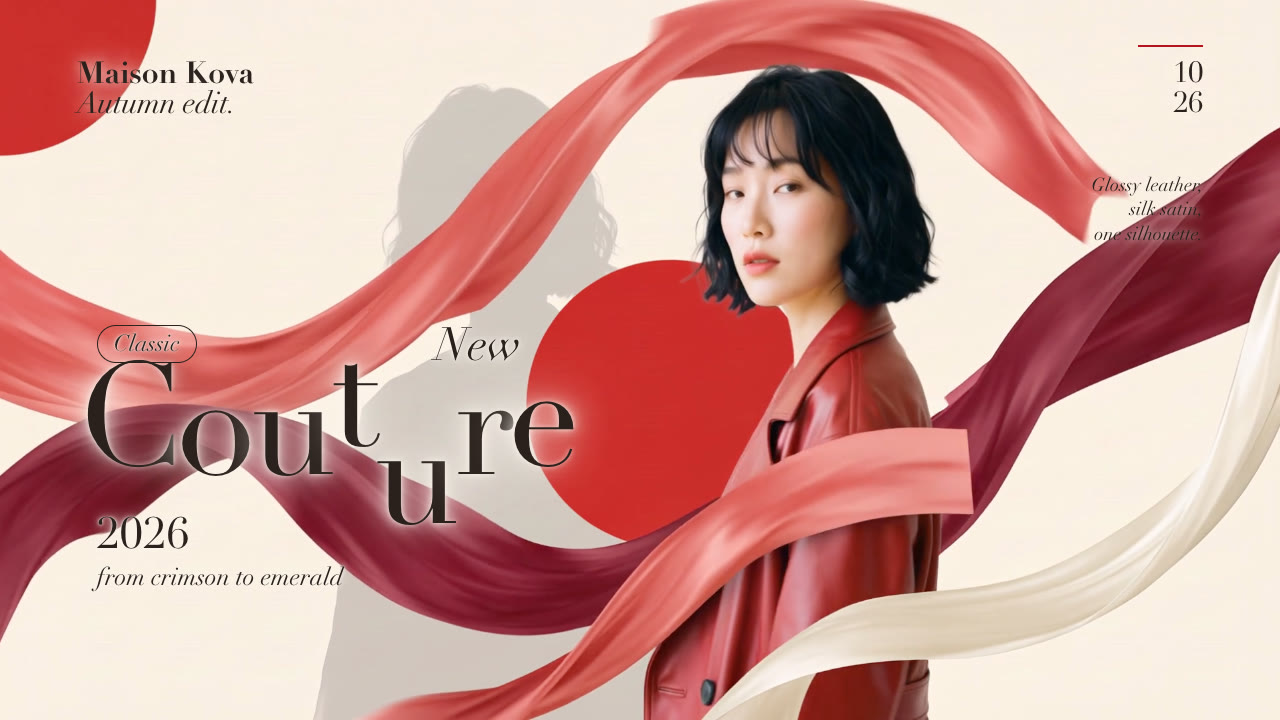
A popular short-form fashion format goes like this: a model stands in front of a poster-style backdrop, glossy silk ribbons sweep around her, she turns away as the ribbons spin with her, and when she turns back her outfit has changed colour, with the ribbons, the discs and the background changing along with it. It reads like an expensive shoot, but you can make it from one photo.
Image-to-video models animate a still. On their own they drift: the face changes, the outfit melts, the ribbons go wherever they like. The fix is to decide the important frames first and let the video model only fill in the motion between them:
An image-editing model (we use Nano Banana 2) makes all three from your photo, so the face, hair and makeup carry over. A video model that takes a start frame and an end frame (Kling 2.5 Turbo) then animates opening → turn and turn → new look as two 5-second clips; because they share the turn frame, they join into one continuous shot. With the turn and the new look pinned, the change looks deliberate, not random.
The editorial look comes from the type: a big serif word with staggered letters (one rises, one drops below the line), a masthead, a date and two or three short notes in italics. Put the big word over the clothes, not the face, and keep the small type away from busy ribbons. Changing the accent colour at the same moment as the outfit ties the two together.
The Silk Ribbon Fashion Film Skill runs the whole thing: you give your agent one half-body, front-facing photo, the new look and the copy.
Make a silk ribbon fashion film from this photo of our model for the autumn drop: she changes from the red leather coat into our emerald suit. Title "Couture", masthead "Maison Kova", date 10/26. 9:16 and 4:5.
It generates the three keyframes and shows them to you first, then the 10-second shot, then renders the type over it in 9:16, 4:5, 1:1 or 16:9. Here is the sample film and its input file. More on agent-made video: Claude Opus 5.5 video generation.
The footage is billed as model usage to your own API key: about $0.24 for the three Nano Banana 2 keyframes and about $0.70 for the 10-second Kling 2.5 Turbo video, so under $1 per format at October 2026 prices. We compared newer, pricier video models on the same keyframes and saw no visible difference for this shot. The type layer renders on your own machine, so changing the copy later costs nothing.
Use a sharp, evenly lit, front-facing half-body photo of one person, with the face and outfit clearly visible. And only use a photo of someone who agreed to appear in your marketing, or stock whose licence covers advertising. The sample on our site uses an AI-generated model, not a real person.
Can the colour change go in any direction? Yes. The opening look takes its colours from the photo; the closing look is whatever you describe, from a different colour of the same garment to a completely new outfit.
Why does it sometimes change the face? Each step is generated. Check the three keyframes before the video step and regenerate any that drift; the video follows the keyframes closely.
Can I use it for products? It's built around a person turning. For products, try a product reveal instead.