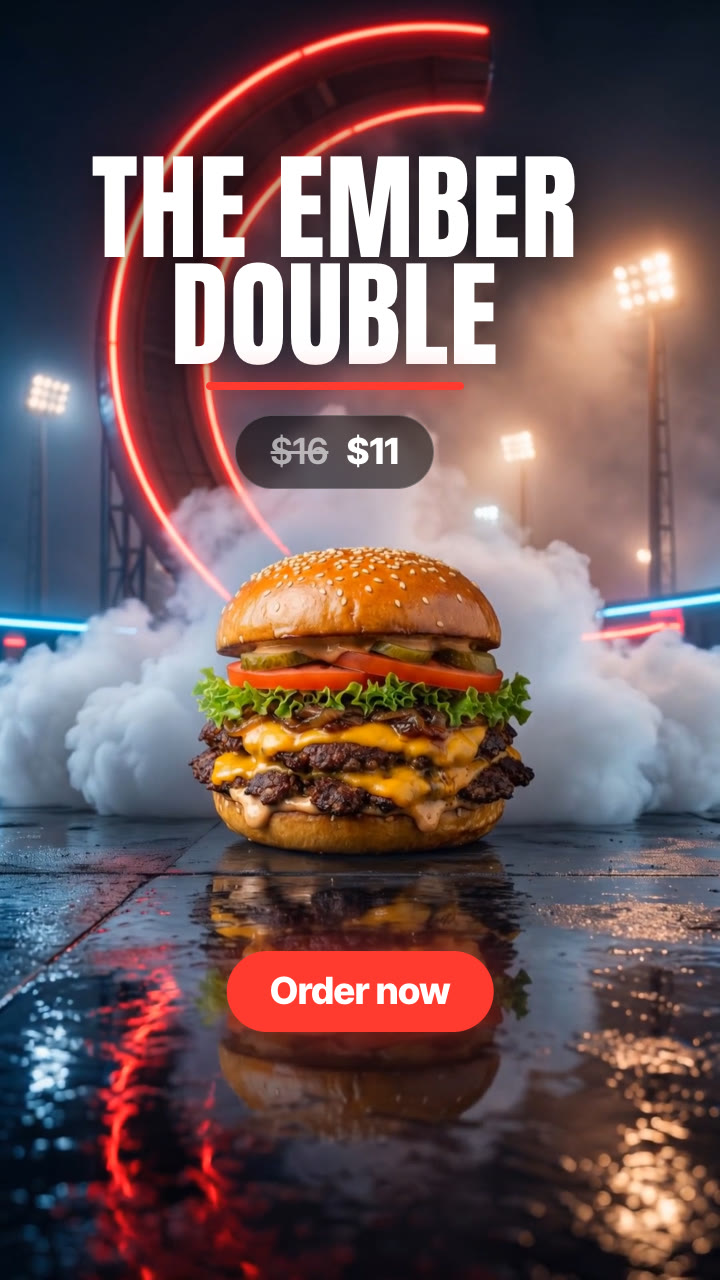
Your product races up a giant C-shaped neon track, hangs upside down at the top, drops, rolls upright on white jets and lands in smoke: the viral flying-car launch, made from one product photo.
Give it one product photo. It makes a 13-second ad from the viral flying-car launch: a 3-2-1 countdown, your product races up a towering C-shaped neon track at night until it hangs upside down at the top, lets go, rolls upright on white jets and lands in smoke; then its name, price and CTA. Line up several products back to back, in 9:16 or 4:5.
/ramp-launch Make a ramp launch for The Ember Double burger and our Solace Runner sneaker: kicker "Black Friday drop", the burger $16 → $11 with "Order now", the sneaker $180 → $126 with "Shop the drop". Vertical and 4:5.
A 3-2-1 countdown over your product, sitting at night at the foot of a towering C-shaped track lined with glowing neon: the shape from this season's viral flying-car launch. On "go" it races up the track, straight up the vertical and over the top, until it hangs upside down under the curl. Then it lets go, white jets fire to roll it upright, and it lands on its feet in billowing smoke under the floodlights. As it touches down, its name rises in huge type, the price lands and the CTA follows. Add more products and each one gets its own launch, cut together with a flash.
How it works
Brief: your agent asks only for what's missing: one clear photo of each product (up to four), its name as it should appear, optionally the price (and the regular price), a short kicker over the countdown and a CTA, the neon colour, and the formats. You also need an API key for the two models it calls, Nano Banana 2 and Kling 2.5 Turbo; each product's film costs about $0.94 in model usage.
Keyframes: it turns each product photo into three stills (at the foot of the C-shaped track, hanging upside down at the top, landed in the smoke) and shows them to you before spending more.
Motion: Kling 2.5 Turbo animates the climb up the C to the upside-down hang, then the drop, the roll upright on white jets and the landing: about 10 seconds per product.
Countdown, name, price and CTA: rendered over the film on your machine in any language, for 9:16, 4:5 or 1:1.
Tips
Use a sharp photo of the product on its own; it is kept as it is in the photo and is the hero of every shot.
Check all three keyframes before the video step: the product at the foot of the C-shaped track, hanging upside down at the top, and landed. Keyframes cost about $0.24, the video about $0.70.
Keep the name to two short lines and put a line break where it should split.
Switch the neon to your brand colour (for example "electric blue") and set the CTA colour to match.
The footage is silent: add an engine roar or the trending sound in the app.
What you need before you start
You bring
One clear photo of each product (up to four), its name as it should appear, optionally the price (and the regular price), a short kicker over the countdown and a CTA, the neon colour, and the formats. You also need an API key for the two models it calls, Nano Banana 2 and Kling 2.5 Turbo; each product's film costs about $0.94 in model usage.
Dependencies
Node.js 20 or newer — required · Google Chrome (or CHROME_PATH) — required · An API key for Nano Banana 2 and Kling 2.5 Turbo — required · FFmpeg — bundled via ffmpeg-static after npm install
Outside costs
Model usage, billed to your own API key: about $0.24 for the three Nano Banana 2 keyframes and $0.70 for the two 5-second Kling 2.5 Turbo clips, so about $0.94 per product (October 2026 prices). The countdown, name, price, CTA and the final MP4 render free on your machine.
Last tested
v1.0.0 —
User reviews
No reviews yet. Install the Skill and be the first to rate it.
FAQ
What do I need besides the product photo?
An API key for the two models the Skill calls: Nano Banana 2 for the three keyframes and Kling 2.5 Turbo for the motion. You set it in your own terminal, and the Skill's setup step shows where to get it. Model usage is billed to your key: about $0.94 per product at October 2026 prices.
Does my product stay the same?
The three keyframes are made from your photo and keep its shape, colours and details, and your agent shows them to you before the video step. If one drifts, run that step again before making the video.
Can I launch several products?
Yes, up to four in one video. Each gets its own countdown, launch and landing, cut together with a flash.
Can I skip the countdown?
Yes. Turn it off and the video starts straight on the launch.