Hands open a delivery box with your products inside, then each one drops into a shopping bag with its sale price while the savings count up to the total.
Give it photos of one to four products with their regular and sale prices. It makes a Black Friday haul ad: an AI unboxing shot of a delivery box with your products in tissue paper, then each product pops up with its old price struck through and drops into a shopping bag, the savings count up, and it ends on the total saved, the deadline, the code and your CTA.
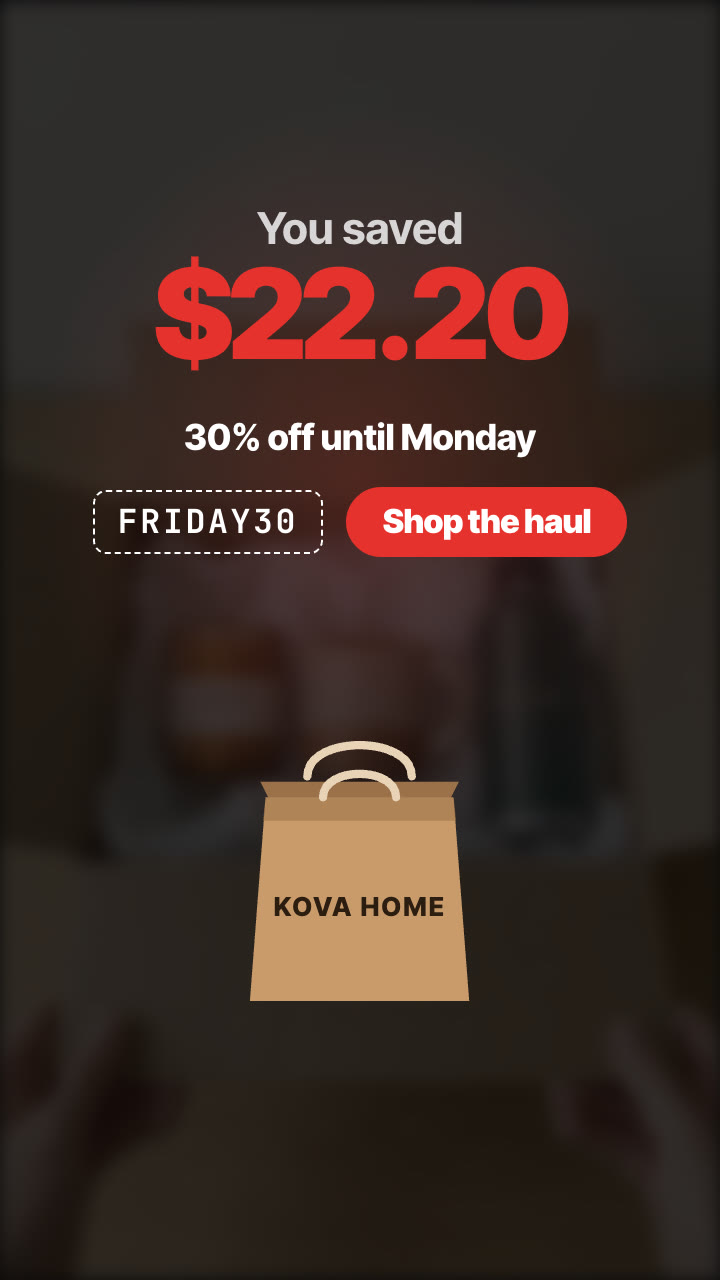
/unboxing-haul Make a Black Friday unboxing haul for Kova Home with our candle ($24 → $16.80), mug ($18 → $12.60) and bottle ($32 → $22.40). Caption "My Black Friday haul", 30% off until Monday, code FRIDAY30, button "Shop the haul". Vertical and 4:5.
A brown delivery box sits on a table. Two hands pull off the tape, open the flaps and push the tissue paper aside, and your products are inside. Then the shot freezes and darkens, a shopping bag with your brand rises from the bottom, and the haul begins: each product pops up with its name, the regular price struck through and the sale price in red, then drops into the bag while the savings at the top count up. It ends with the total saved, big, over the deadline, the promo code and your call to action.
How it works
Brief: your agent asks only for what's missing: photos of one to four products (transparent PNG or SVG works best for the haul), each with its name, real regular price and sale price, plus optionally your brand for the bag, a caption, the deadline, a promo code and a CTA. You also need an API key for the two models it calls, Nano Banana 2 and Kling 2.5 Turbo; each film costs about $0.51 in model usage.
Keyframes: it puts your products into a delivery box in two stills (the box closed and taped, then open with your products in tissue paper) and shows them to you before spending more.
Motion: Kling 2.5 Turbo animates the hands opening the box in 5 seconds.
The haul: your machine draws the rest in any language: each product with its prices dropping into a shopping bag, the savings counting up, then the total, deadline, code and CTA, for 9:16, 4:5 or 1:1.
Tips
Use transparent PNG or SVG product images: the box shot is made from them, and they drop cleanly into the bag.
Use real prices: the regular price must be what each product really sold for. The total saved is worked out from your prices, so it is always consistent.
Check both keyframes before the video step: every product must be in the box and look like its photo. Keyframes cost about $0.16, the video about $0.35.
Two to four products work best; each takes about 1.3 seconds in the haul. The film is silent, so add the trending sound in the app.
What you need before you start
You bring
Photos of one to four products (transparent PNG or SVG works best for the haul), each with its name, real regular price and sale price, plus optionally your brand for the bag, a caption, the deadline, a promo code and a CTA. You also need an API key for the two models it calls, Nano Banana 2 and Kling 2.5 Turbo; each film costs about $0.51 in model usage.
Dependencies
Node.js 20 or newer — required · Google Chrome (or CHROME_PATH) — required · An API key for Nano Banana 2 and Kling 2.5 Turbo — required · FFmpeg — bundled via ffmpeg-static after npm install
Outside costs
Model usage, billed to your own API key: about $0.16 for the two Nano Banana 2 keyframes and $0.35 for the 5-second Kling 2.5 Turbo clip, so about $0.51 per film (October 2026 prices). The haul, prices, captions and the final MP4 render free on your machine.
Last tested
v1.0.0 —
User reviews
No reviews yet. Install the Skill and be the first to rate it.
FAQ
What do I need besides the product photos?
An API key for the two models the Skill calls: Nano Banana 2 for the two keyframes of the box and Kling 2.5 Turbo for the unboxing. You set it in your own terminal, and the Skill's setup step shows where to get it. Model usage is billed to your key: about $0.51 per film at October 2026 prices.
Where does the total saved come from?
It adds up the difference between each regular and sale price you give, in your currency. If your prices can't be added up (for example a free gift), you can write the total yourself.
Does the AI draw the prices?
No. The AI makes only the unboxing shot. The prices, the haul and the total are drawn by the template on your machine, so they're always exactly what you typed, in any language.
Does it keep my products as they are?
The box shot is made from your product photos and keeps their shape, colours and labels. Check the keyframes before the video step and run it again if a product drifts.